Why I built Theme Studio — a free AI theme generator for shadcn
Every shadcn project I start stalls at the same step: the theme. Inspired by TweakCN, I built Theme Studio — describe a vibe, drop a screenshot, or paste a URL and get a full OKLCH theme with a live WCAG audit. Free, in my chat or fullscreen.
Every project I start looks the same for the first hour: a competent, anonymous, zinc-grey app that looks like every other shadcn app on the internet. I build a lot of products on that stack — this site included — and the step that consistently eats the most time isn't the data layer or the deployment. It's the theme: the thirty-odd that decide whether a product feels like a brand or a boilerplate.
TweakCN is the tool that changed how I start projects. Sahaj Jain's open-source theme editor gets three things right at once: shadcn themes are just CSS variables, so they can be edited against live components; accessibility should be visible while you design, not audited after; and the fastest route to a theme isn't a colour picker — it's a prompt. Describe a vibe, point at an image, paste a URL. I used it constantly. Eventually I wanted that experience living inside my own site, wired into my chat, with my own opinions baked in. So I built Theme Studio, and I made it free.
What Theme Studio does
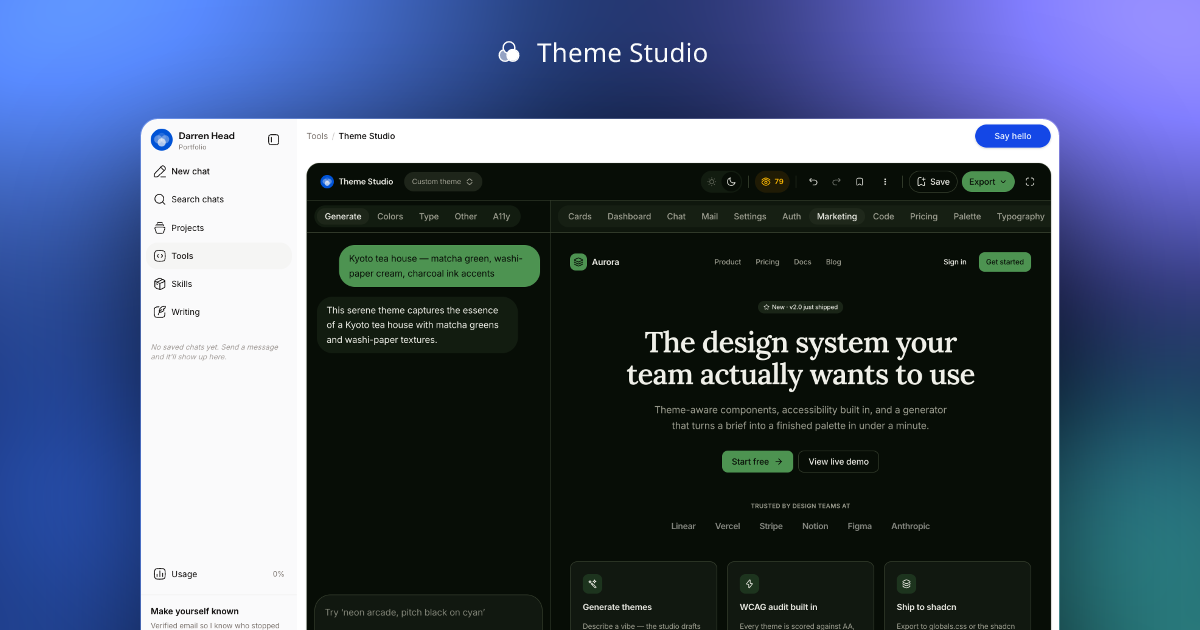
Theme Studio is a generative theme editor for shadcn/ui and Tailwind v4. You describe a vibe in plain language, drop a screenshot, or paste a URL, and it generates a complete theme: 32 colour tokens in light and dark mode, a Google Fonts pairing for sans, serif, and mono, corner radius, letter-spacing, a shadow scale, even an icon-library suggestion. Everything is -native — the perceptually uniform colour space Tailwind v4 standardised on — so lightness behaves predictably when you nudge a hue.
The generation streams. The model emits the theme as structured JSON, and the preview repaints token-by-token as it arrives — background first, then primaries, then chart colours — so you watch the interface change costume instead of staring at a spinner. And the preview isn't a swatch grid: it's eleven real interface surfaces (dashboard, chat, mail, auth, settings, pricing, marketing, a code editor, and more) rendered with the same components the theme will eventually style. A palette that looks great as five squares and terrible as a settings page gets caught immediately.
Every generation produces both colour modes in a single pass, because dark mode is not an inversion — it's a sibling palette with its own contrast budget. Most theme tools treat dark mode as an afterthought you toggle into and then fix by hand. Here the model is required to design both at once, and the sun/moon switch in the topbar flips the entire preview so you can interrogate each side.
URL inspiration deserves a note. Paste a homepage URL and the server fetches the page's og:image and theme-colour metadata, then attaches the actual image bytes to the model as multimodal input. The theme is derived from what the brand looks like, not what its marketing copy says. Screenshots work the same way — drop one in and the model reads colour and typography straight off the pixels.
Accessibility is a score, not a vibe
The thing I admired most in TweakCN was that contrast checking sat inside the design loop. Theme Studio pushes that further: every theme carries a live 2.1 audit of 24 contrast pairs — text pairs graded against 4.5:1 (AA) and 7:1 (AAA), and UI affordances like borders, inputs, and focus rings against the 3:1 non-text minimum. The score lives in the topbar next to the undo button; the A11y tab breaks down every pair with its measured ratio and grade, per mode.
The generator is held to the same standard — the system prompt simply does not allow a theme whose primary button fails AA. But generated themes are starting points, and the moment you start dragging colours around in the editor, the audit follows you in real time. You can watch a careless lightness tweak take a pair from AAA to fail before you ship it.
From a vibe to your codebase in one command
A theme you can't ship is a toy. The export menu is where Theme Studio stops being a demo: copy the code, open the theme in V0, Bolt, or Lovable with a pre-filled prompt, grab the public share page, or copy a ready-to-run install command.
The code dialog gives you three formats: a globals.css written for Tailwind v4's @theme syntax that you paste straight into a Next.js project, a JSON for tooling, and the raw theme payload for round-tripping. Saved themes go one step further — every saved theme gets a registry URL, which means installing one into any shadcn project is a single command:
pnpm dlx shadcn add https://darrenhead.com/r/YOUR-THEME.json
That's the same mechanism shadcn uses for its own components, so it works with the tooling you already have. No copy-paste, no manual token mapping.
Saved themes are share pages
Sign in and save a theme and it becomes a public page at /t/your-slug — a chromeless showcase with the full preview suite, your attribution, a view count, and two buttons that matter: Export (including that registry URL) and Remix in studio, which loads the theme into the editor as a starting point for whoever found it. Themes saved as private stay invisible to everyone but you.
Two ways in, both free
There are two front doors. The first is the chat on my homepage — Theme Studio is wired in as a tool. Pick it from the composer menu, describe a vibe, and the theme generates inside the conversation as a card with its own mini preview, swatches, and an export menu. One tap on "Open in Theme Studio" hands the unsaved theme across to the full editor.
The second is the standalone studio at /tools/theme-studio, which also has a fullscreen mode that takes the entire viewport — the layout I reach for when I'm actually designing rather than demoing. Same editor, no chrome.
Free means free, with honest limits: three generations a day without an account, eight a day plus twenty saves if you sign in. Behind that sit site-wide daily and monthly ceilings, atomic usage counters in Postgres, and a kill switch I can flip from an admin panel without deploying — the unglamorous plumbing that makes giving away an AI tool sustainable rather than brave. If you hit a cap, it tells you exactly when it resets.
Standing on TweakCN's shoulders
I want to be specific about the credit. Beyond the inspiration, Theme Studio ships eighteen of TweakCN's preset themes — vendored under their Apache-2.0 licence and converted from hex to OKLCH — alongside my own site theme and the canonical shadcn neutral. They power the preset picker and the "Surprise me" button, and they're the fastest way to feel what the editor can do before you spend a generation. If you want a more battle-tested, open-source editor with a bigger community, go use TweakCN — genuinely. Theme Studio is my take on the same problem: chat-native, streaming, audit-first, and built to hand themes to the AI coding tools I actually use.
Under the hood it's a small, sharp stack: Gemini Flash streaming structured output against a strict Zod schema, partial JSON repainting the preview as it arrives, and a 2,000-line system prompt that encodes the rules a good theme obeys — both modes always, AA contrast always, coherent chart hues, typography that matches the vibe instead of defaulting to Inter. I wrote about the architecture thinking in a separate post on generative design systems; this one is the tour.
Try it
Open the chat and ask for a theme, or go straight to Theme Studio — no account needed. Describe the vibe of something you love, paste your company's URL, or hit "Surprise me". If you make something good, save it and send me the /t/ link — I'd love to see what people design with it.